

Storyteller

Reference - for BAM KBH

Ticker Template

BAM Ticker Template Design
Usage

Displays show titles and show times on the Ticker Channel

Ticker Channel

Resolution: 2880 pixels wide x 360 pixels high
Aspect Ratio:  8:1

Template Specifications

Rotation
For the show listings, up to 16 shows may be present at one time. The template displays four shows at time. Should more than four shows be available, the first four shows will display for 15 second, then the next four shows will rotate in, and continually rotate through all available data.

Rotation is done with a brief fade to ease the transition between items.

Rotation only applies to the show listing.

Static Content
The “Showtimes” header, the “Admissions” header, the four pricing headers, the two boundary markers, the “BAM KBH” header and the “In Memory of…” header are considered static content. These will not be available for update or alteration in Storyteller.

Font
Use the free Google font “News Cycle”. The font family is hard coded in the template & not editable in Storyteller.
Creating Instances – Data Entry
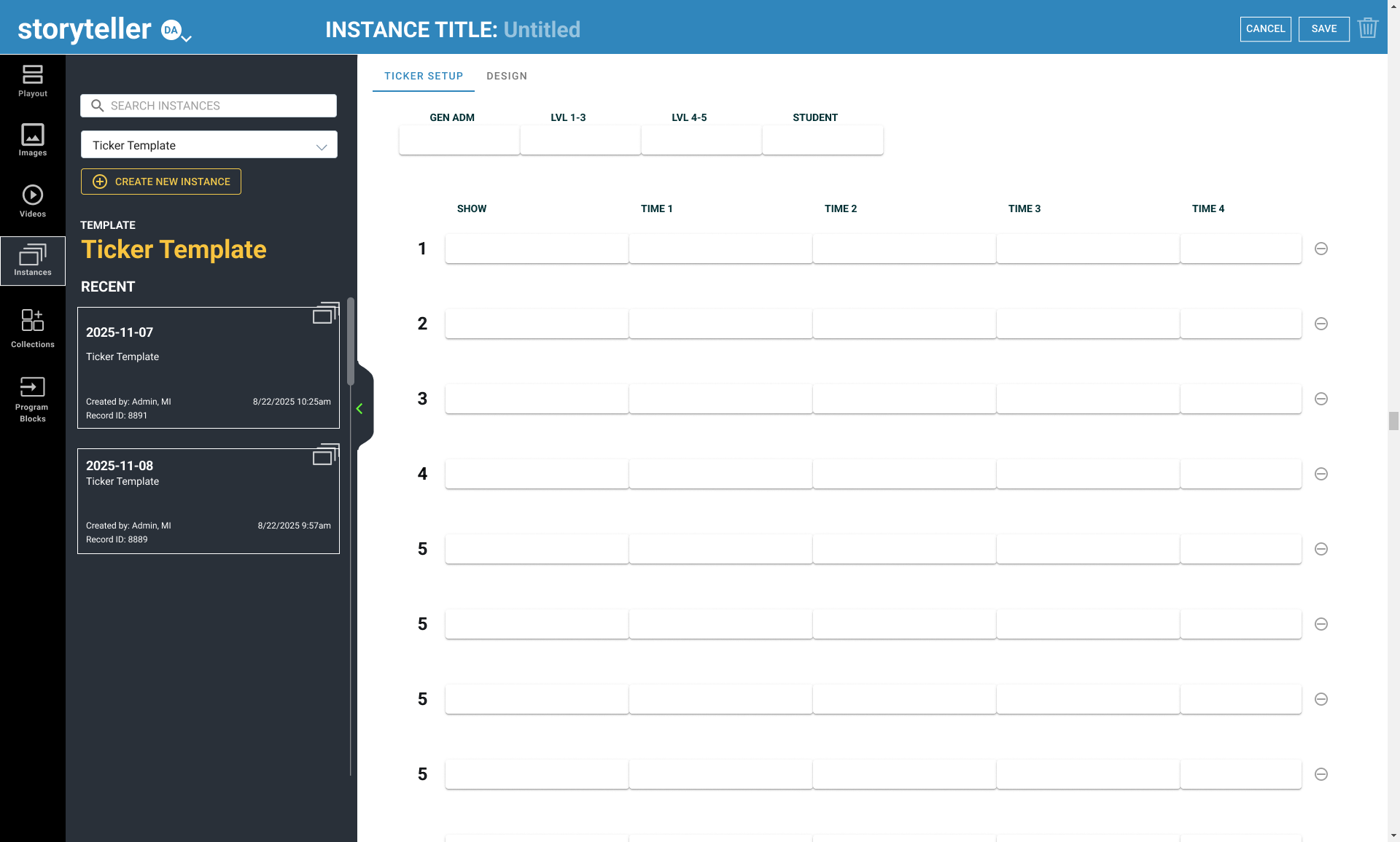
BAM Ticker Data Entry step

The “Ticker Setup” will contain 16 rows, each of which contains text fields for show name, and four potential show times.

Rules for the rows are as follows:

  • Given the limited space available and the desired fonts and sizing (see Design below), text wrap will not be an option. As such, fields will have a maximum character limit for data entry that allows for text without a wrap.
  • The “Show Name” will not have a separate place for the show rating, that is included in both the string and the maximum character limit for the show name.
  • “Show Name” max character count: 51 (including spaces)
  • “Show Times” are completely optional. Only the show name is considered to be a trigger as to if a row will be displayed or not. This means that any row with times, but not a show name, will be ignored by the template.
  • “Show Times” max character count: 12 (including spaces)
  • As per the example/specification, no validation will take place on any of the data entry fields beyond a maximum number of characters. This includes formatting to assure that times are all entered identically, prices are numeric, etc. All text will be used exactly as entered.
  • Any, all, or none of the show times need to be filled out for the row to be considered valid and shown on the template.

Admissions data entry will include 1 admission type entry, and 4 price entries, one for each of the four Admission types.
  • Given the limited space available and the desired fonts and sizing (see Design below), text wrap will not be an option. As such, fields will have a maximum character limit for data entry that allows for text without a wrap.
  • Admission Type max character count: 40 (including spaces)
  • Pricing max character count: 6 (including spaces)
  • As per the example/specification, no validation will take place on any of the data entry fields beyond a maximum number of characters. This includes formatting to include a $, assuring that values are in a recognized monetary format, etc.
  • If multiple instances are used, the data will need to be re-entered for each instance of the template.
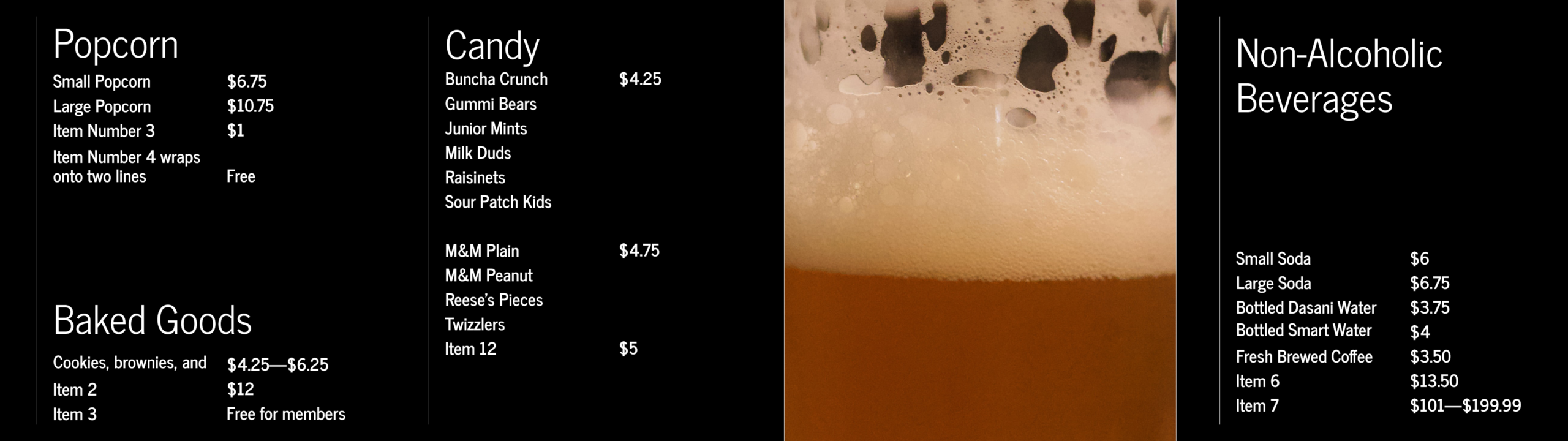
BAM Menu Board 1/2 Template Design
Usage

The Menu Board 1/2 Template designed is for the Menu 1/2 Channel.
The Menu Board 1/2 Template display items and item prices for the Popcorn, Baked Goods, Candy, and Non-Alcoholic Beverages categories.

Menuboards 1/2 Channel

Resolution:  3840 pixels wide x 1080 pixels high
Aspect Ratio 32:9 (3.56)

Template Specifications

Static Content
The headers Popcorn, Baked Goods, Candy, Non-Alcoholic Beverages, as well as the photo are considered static content.

Photo
width: 967px
height: 1080px
72 dpi

Maximum Number of Product Items
Popcorn: 4
Baked goods: 3
Candy: 12
Non-Alcoholic Beverages: 7

Product Name

  • Popcorn, Baked Goods, and Non-Alcoholic Beverages categories
    • Wraps – two lines max
    • Max Characters: 45 (including spaces)
  • Candy category
    • does not wrap 
    • Max Characters: 16 (including spaces)

Product Price

  • does not wrap
  • Max Characters: 16 (including spaces)

Pop Corn and Baked Goods Categories
These two categories are vertically justified. The Baked Goods category will get pushed up when more items are added or item names wrap onto two lines.

Non-Alcoholic Beverages
The items in the Non-Alcoholic Beverages category are vertically justified. The items will get pushed up when more items are added or item names wrap onto two lines.

Font
Use the free Google font “News Cycle”. The font family is hard coded in the template & not editable in Storyteller.
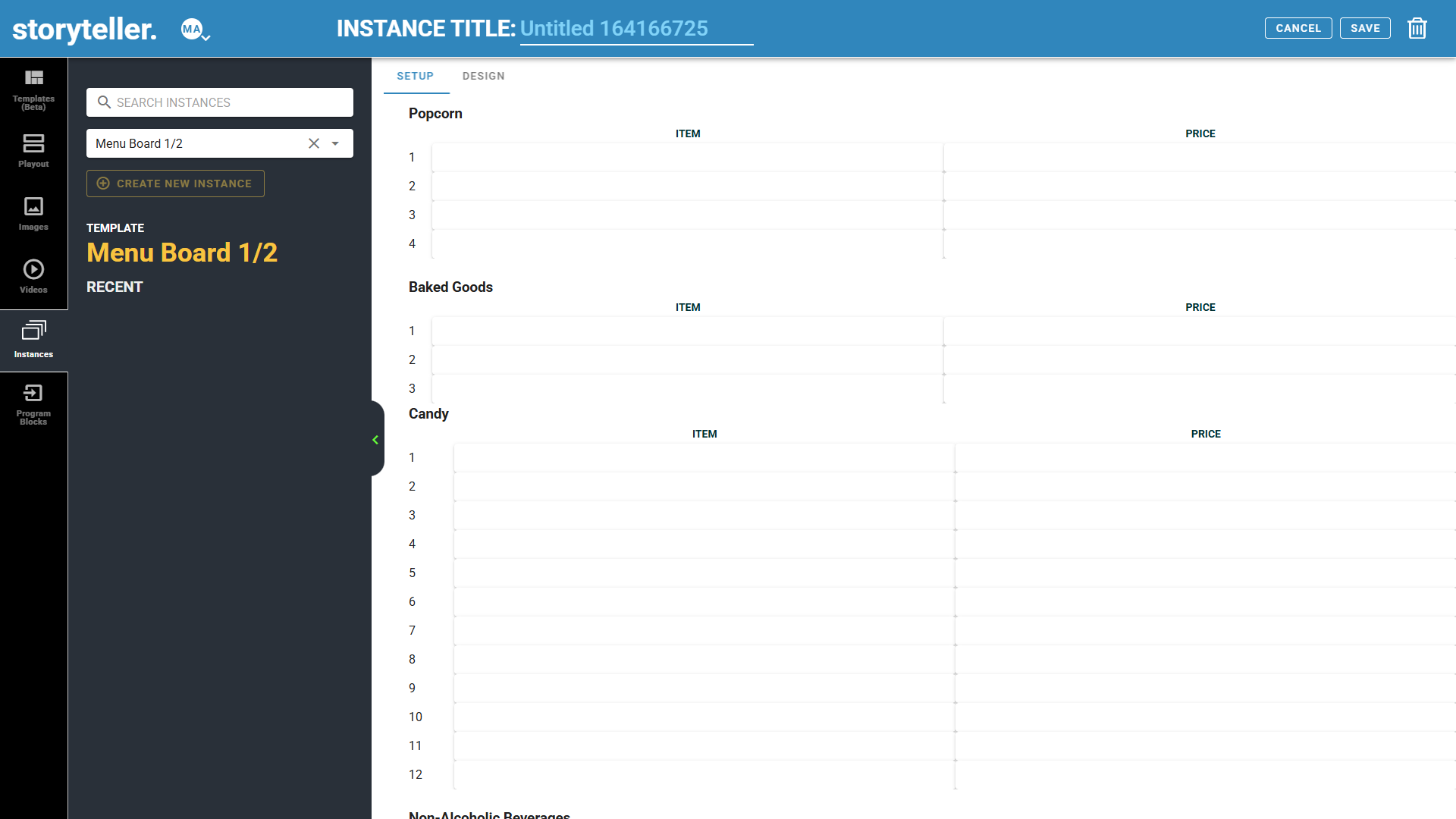
Creating Instances – Data Entry
BAM Menu Board 1/2 Data Entry step

The Menu Board setup contains sets of text fields for entry of product data.

Data entry will include text field entries for:

  • Product names
  • Product prices

Rules for data entry are as follows:

  • As per the example/specification, no validation will take place on any of the data entry fields. This includes formatting to ensure that prices are numeric. All text will be used exactly as entered.
  • Product Name
    • If no data has been entered for the price field, the template will display nothing for that field.
    • Leave the entire row empty to create a gap space between items
    • User will not be able to manually enter line breaks
    • Max Characters: 45 (including spaces)
  • Product Price
    • If no data has been entered for the price field, the template will display nothing for that field.
    • Dollar signs will not be hard coded in the template. The user would manually type the dollar sign during data entry.16 (including spaces)
    • Max Characters: 16 (including spaces)
BAM Menu Board 3/4 Template Design
Usage

The Menu Board 3/4 Template designed is for the Menu 3/4 Channel.
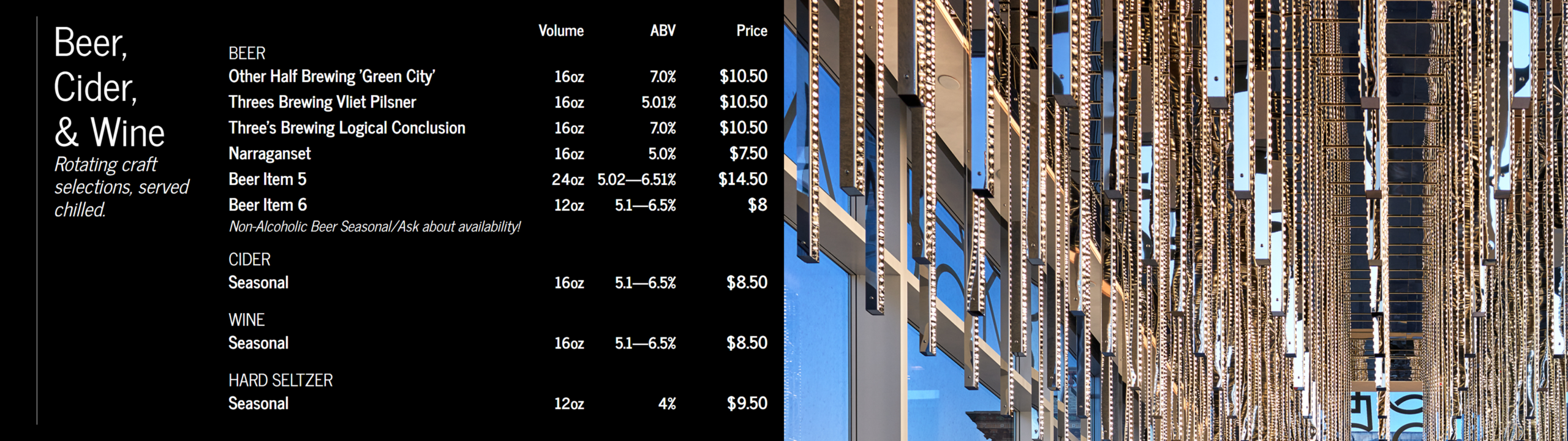
The Menu Board 3/4 Template display items and item prices for the Beer, Cider, & Wine categories.

Menuboards 3/4 Channel

Resolution:  3840 pixels wide x 1080 pixels high
Aspect Ratio 32:9 (3.56)

Template Specifications

Static Content
The headers “Beer, Cider, & Wine”, Beer, Cider, Wine, Hard Seltzer, Volume, ABV, Price, as well as the photo are static content.

Photo
width: 1920px
height: 1080px
72 dpi

Maximum Number of Product Items
Beers: 12
Cider: 1
Wine: 1
Hard Seltzer: 1

Beer Product Rotation
Max of twelve (12) beer products. The design allows for six (6) products to be displayed at one time. If there are more than 6 products, the following standards will apply:

  • Rotation only applies to the Beer products listings.
  • The first 6 products will display for 20 seconds.
  • If there is a product in row 7, products 7,8,9,10,11, and 12 will then display for 20 seconds.
    This will happen even if 8,9,10,11, and 12 are empty.
  • Rows will continually loop through all available data until either a new instance is present, or until the instance itself is updated and the new copy downloaded to the player.
  • Rotation is done with a brief fade to ease the transition between items.

Product Sub-header

  • Max Characters: 200 (including spaces)
  • Wraps
  • Italics
  • Example Data: Rotating craft selections, served chilled.

Product Name

  • Max Characters: 38 (including spaces)
  • does not wrap

Volume

  • Max Characters: 10 (including spaces)
  • does not wrap

ABV

  • Max Characters: 10 (including spaces)
  • does not wrap

Price

  • Max Characters: 16 (including spaces)
  • does not wrap

Product Description

  • Max Characters: 90 (including spaces)
  • does not wrap
  • Italics
  • Example Data: Non-Alcoholic Beer Seasonal/Ask about availability!

Font
Use the free Google font “News Cycle”. The font family is hard coded in the template & not editable in Storyteller.
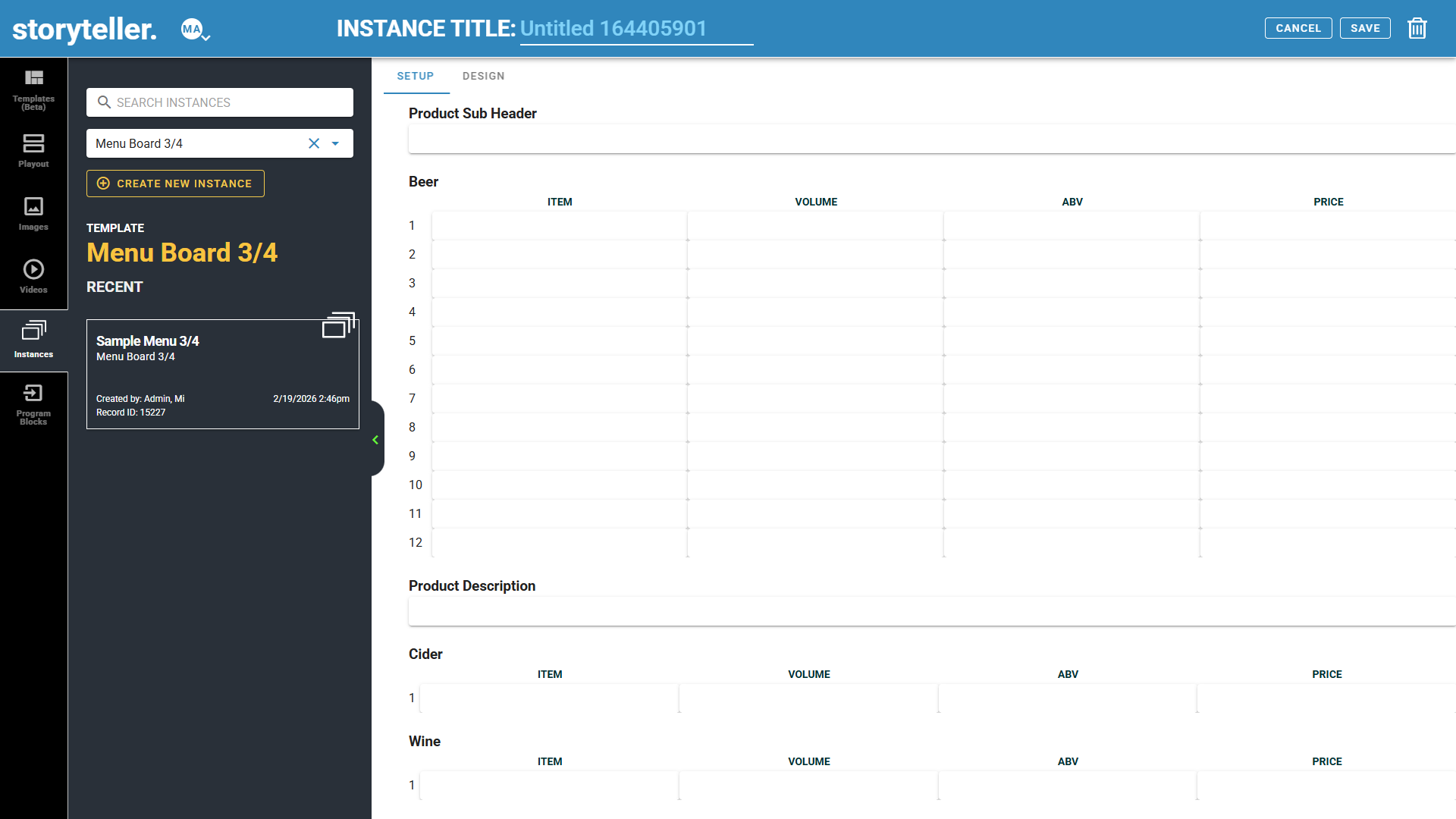
Creating Instances – Data Entry
BAM Menu Board 3/4 Data Entry step

The Menu Board setup contains sets of text fields for entry of product data.

Data entry will include text field entries for:

  • Product Sub-header (Ex: “Rotating craft selections, served chilled”)
  • Category (Ex: “Beer”, “Cider”, etc.)
  • Product names
  • Product prices

Rules for data entry are as follows:

  • As per the example/specification, no validation will take place on any of the data entry fields. This includes formatting to assure that prices are numeric. All text will be used exactly as entered.
  • Product Sub-header
    • Italic is hard coded into the css because the News Cycle font does not support italic style.
    • If no data has been entered for this field the field will display nothing.
    • User will not be able to manually enter line breaks
    • Max Characters: 200 (including spaces)
  • Beer Products
    • Beer Products will contain 12 rows, each of which contains
      • product name
      •  volume
      •  abv
      • price
    • And one row containing the Product Description (Ex: “Non-Alcoholic Beer Seasonal/Ask about availability!”)
      • Italic is hard coded into the css because the News Cycle font does not support italic style.
      • Max Characters: 90 (including spaces)
  • Cider, Wine and Hard Seltzer Products will contain one row each containing
    • product name
    • volume
    • abv
    • price
  • Product Names
    • Text field
    • Leave the entire row empty to create a gap space between items
    • If no data has been entered for this field, the field will display nothing.
  • Volume
    • Text field
    • If no data has been entered for this field, the field will display nothing.
    • The text “oz” will not be hard coded in the template. The user would manually type the text during data entry.
    • Max Characters: 10 (including spaces)
  • ABV
    • Text field
    • If no data has been entered for this field, the field will display nothing.
    • Percent signs ( % )will not be hard coded in the template. The user would manually type the percent sign during data entry.
    • Max Characters: 10 (including spaces)
  • Product Prices
    • Text field
    • If no data has been entered for this field the field will display nothing.
    • Dollar signs ( $ ) will not be hard coded in the template. The user would manually type the dollar sign during data entry.
    • Max Characters: 16 (including spaces)

Cinema Vertical Movie Poster Templates

BAM Cinema A Vertical Movie Poster Template Design
Usage

There are three Cinema Vertical Movie Poster templates, one for each of the three Cinema (V) channels:

  • Cinema A Vertical Movie Poster
  • Cinema B Vertical Movie Poster
  • Cinema C Vertical Movie Poster
Cinema (V) Channels

Resolution:  1080 pixels wide by 1920 pixels high
Aspect Ratio 9:16
  • Cinema A (V)
  • Cinema B (V)
  • Cinema C (V)
Template Specifications 
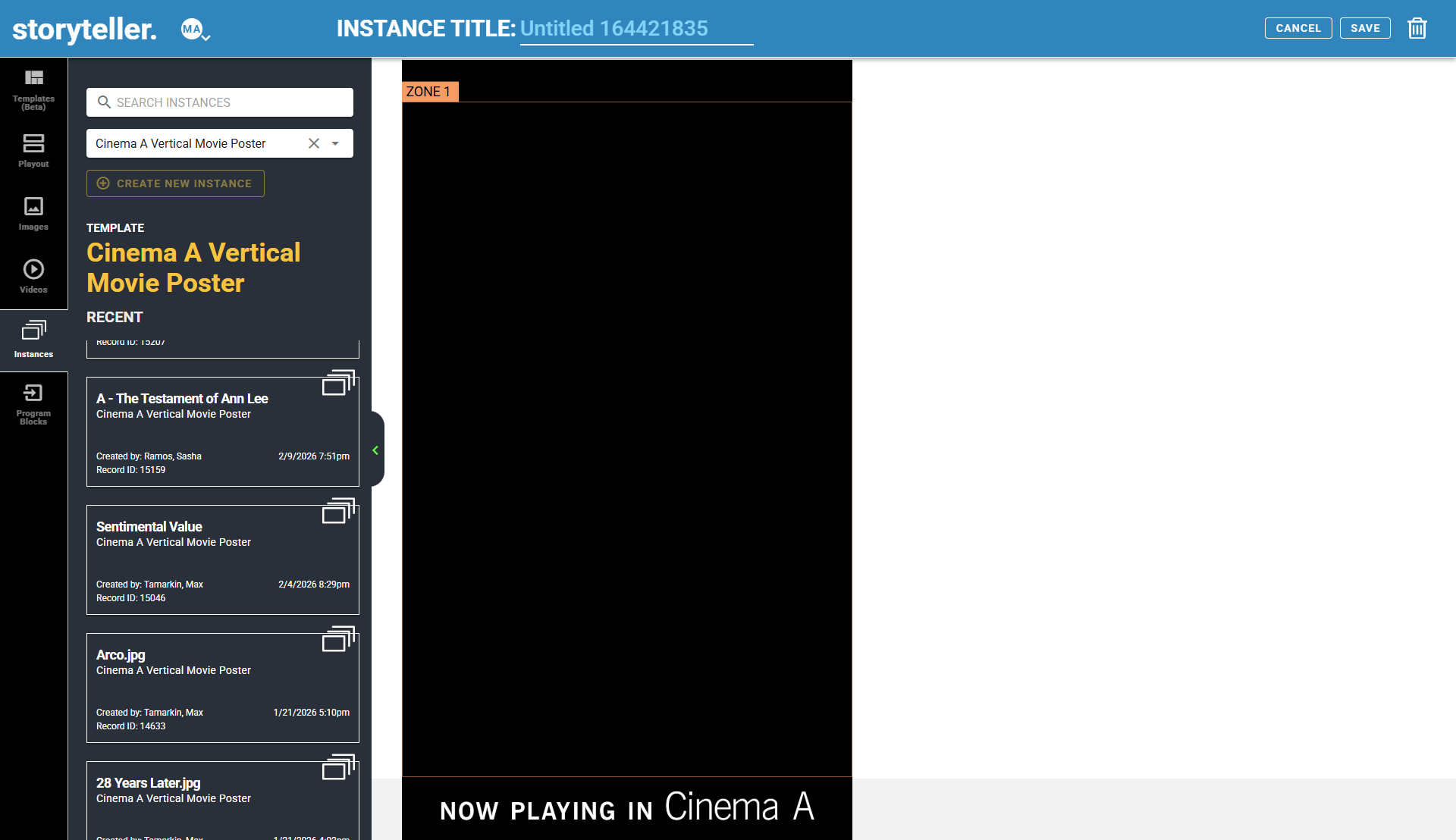
BAM Cinema A Vertical Movie Poster Data Entry step

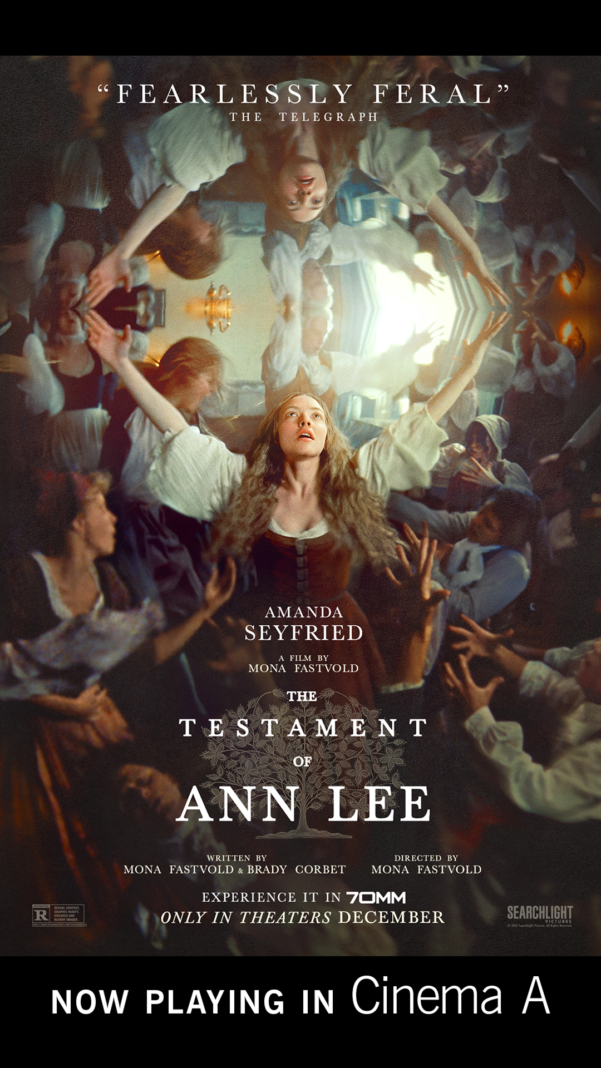
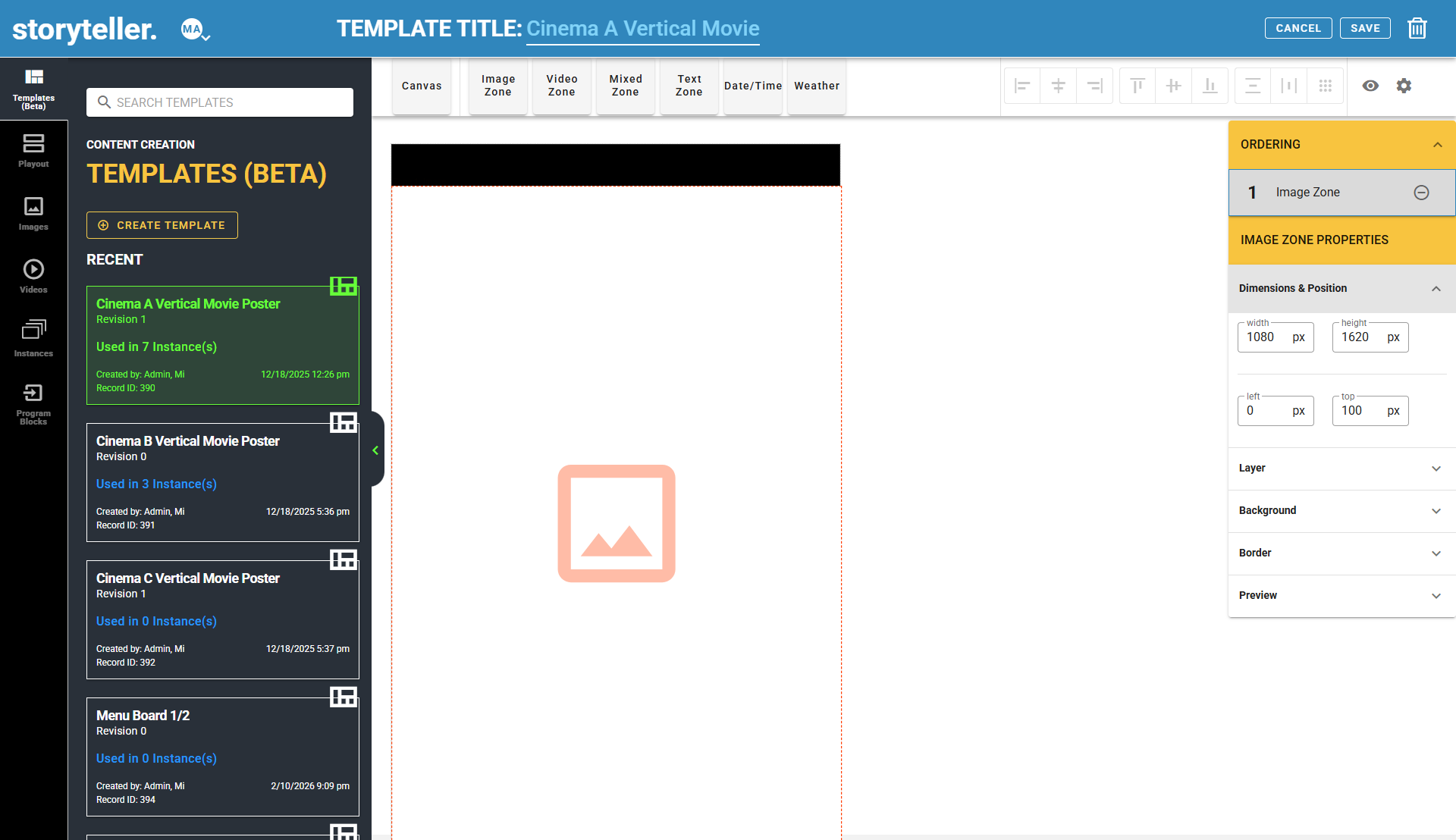
The three Cinema Vertical Movie Poster templates was created in Templates Creator. Each template consists of one static background image and one dynamic Image Zone.

Zone 1

  • Image Zone
  • Accepts one image asset (the movie poster)
  • 1080 pixels wide x 1620 pixels high
  • JPG or PNG

Static background image

  • When creating instances, you will not be able to edit this static image
Editing the templates in Template Creator
BAM Cinema Vertical Movie Poster template - how to edit in Template Creator

You may edit the three Cinema Vertical Movie Poster templates, if needed, in Template Creator.

See Creating a Template on using Template Creator.

Please note:

Any edits made to Templates may not be undone. We recommend creating a new Template.

Edits will not be updated retroactively to previously created instances. 

Static background image

  • Each static background image should include text indicating which Cinema the movie is playing in. For example, “Now Playing in Cinema A”
  • 1080 pixels wide by 1920 pixels high
  • JPG or PNG

Image Zone

  • Zone 1 is an Image zone
  • Dimensions: 1080px by 1620px
  • Position: 0px from the left, 100px from top
  • Background color: #000
Contacting Support

Ticket Portal: https://support.metinteractive.net/support/home

Email: send an email describing the issue in detail to support@metinteractive.com  

Phone: (800) 951-8407, Opt 2

This page contains proprietary information furnished for training purposes only; except with the express written consent of Metropolitan interactive, Ltd. (herein, Metinteractive) such information may not be published, disclosed, or used for any other purpose. This document and all portions thereof, including but not limited to, any copyright, trade secret and other intellectual property rights relating thereto, are and always shall remain the sole property of Metinteractive.